Transcription Backend
The backend transcription model is the system that receives raw audio, processes it, and returns the text version of what was spoken. It handles tasks like chunking audio, running it through a speech-to-text engine, and sending back structured transcription results.
Why It’s Useful
Using a backend model keeps all the heavy processing off the user’s device, giving faster and more reliable results. It also lets you centralize improvements (like better accuracy, noise handling, or new features) without requiring users to update anything. Overall, it makes transcription consistent, scalable, and easy to integrate with commands or game logic.
Setting up Backend Transcription for Online mode
For Mac/Linux
- Clone this project.
- Navigate to the folder called backend
- Ensure you have python version 3.11 installed To check your version, use command
python3 --version - Create a virtual environment using the command
python3.11 -m venv venv - Enter the virtual environment using the command
source venv/bin/activate - Install all the requirements using command
pip install -r requirements.txt - Once all requirements have installed successfully, start the server using the command
fastapi dev main.py
For Windows
- Clone this project.
- Navigate to the folder called backend
- Ensure you have python version 3.11 installed. To check your version, use command
python3 --version - Create a virtual environment using the command
python3.11 -m venv venv - Enter the virtual environment using the command
venv\Scripts\activate - Install all the requirements using command
pip install -r requirementsWindows.txt - Once all requirements have installed successfully, start the server using the command
fastapi dev main.py
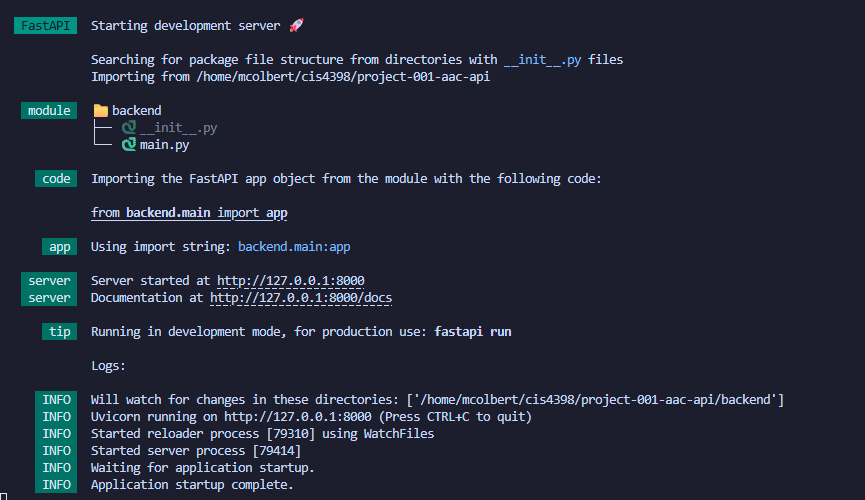
When running the backend locally, you should see this when it is successfully running: