Command History
For debugging use, we have provided a pre configured modal that you can easily attach to a button on your webpage.
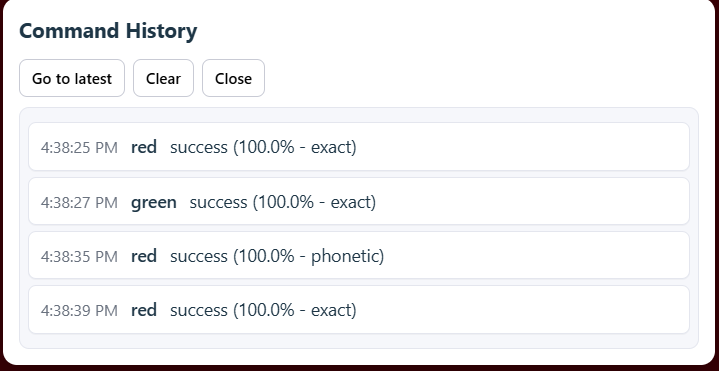
This modal will update in real-time to allow the user or game developer see which commands have been executed (successfully or unsuccessfully) by our library. It includes a timestamp of when the command was executed.
To add this to your web page, simply add
const voiceApi = new AACVoiceAPI();

voice.displayCommandHistory();
For example, we have this function attached to a button
    const showCommandHistory = () => {
        try {
            voiceApi.current?.displayCommandHistory();

        } catch (e: any) {
            appendLog("[Error] Display popup failed: " + e.message);
        }
    };

    <button onClick={showCommandHistory}>Show History</button>
Here is an example of what the modal looks like with some commands processed:
What's going on in this picture?
This picture shows the commands that were successfully executed based on the user’s spoken words. Some commands match exactly, while others are triggered through phonetic matching. This helps users understand when a command was recognized by sound similarity rather than an exact word match.
For example, the command the was executed at timestamp 4:38:35 with a phonetic match of 100% had the word 'read' spoken. Since 'read' sounds exactly like 'red' in its past tense form, it has a 100% phonetic match.