Starting and Stopping the API
Starting
This method will continuously collect audio samples from the microphone and attempt to transcribe the audio data. Once the audio is transcribed to text, it will then attempt to check against our command library and execute any valid commands.
This is as simple as calling the start() method that is provided.
const voiceAPI = new AACVoiceAPI();

//initiate already setup

//commands already added to library

voiceApi.start();
Once this command is called (either by button press or on website load), you should expect to see a notification on the browser requesting permission to use the microphone if you do not have microphone permissions enabled by default.
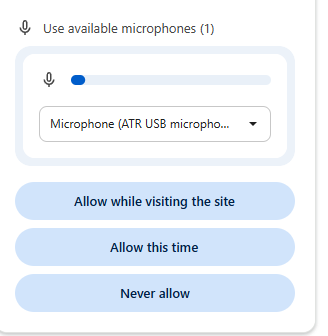
If the user does not allow microphone permission, the library will not be able to execute any voice commands
Stopping
This method will stop any audio data from being collected and processed. It is useful to have this in case the game developer wants the stop listening during a pause screen or menu screen.
const voiceAPI = new AACVoiceAPI();

voiceAPI.stop();